
Case study · Hospitality · Web app
Lufasi Lodges: a night in the forest, booked online, from idea to launch
We took Lufasi Lodges from an idea to a live booking system. That meant the guest booking flow, the admin dashboard behind it, the build, and running it after launch.
- Client
- Lufasi Lodges
- Platforms
- Web: guest booking and admin
- Services
- Discovery, UI/UX, web app build, launch, CTO as a Service
- Live at
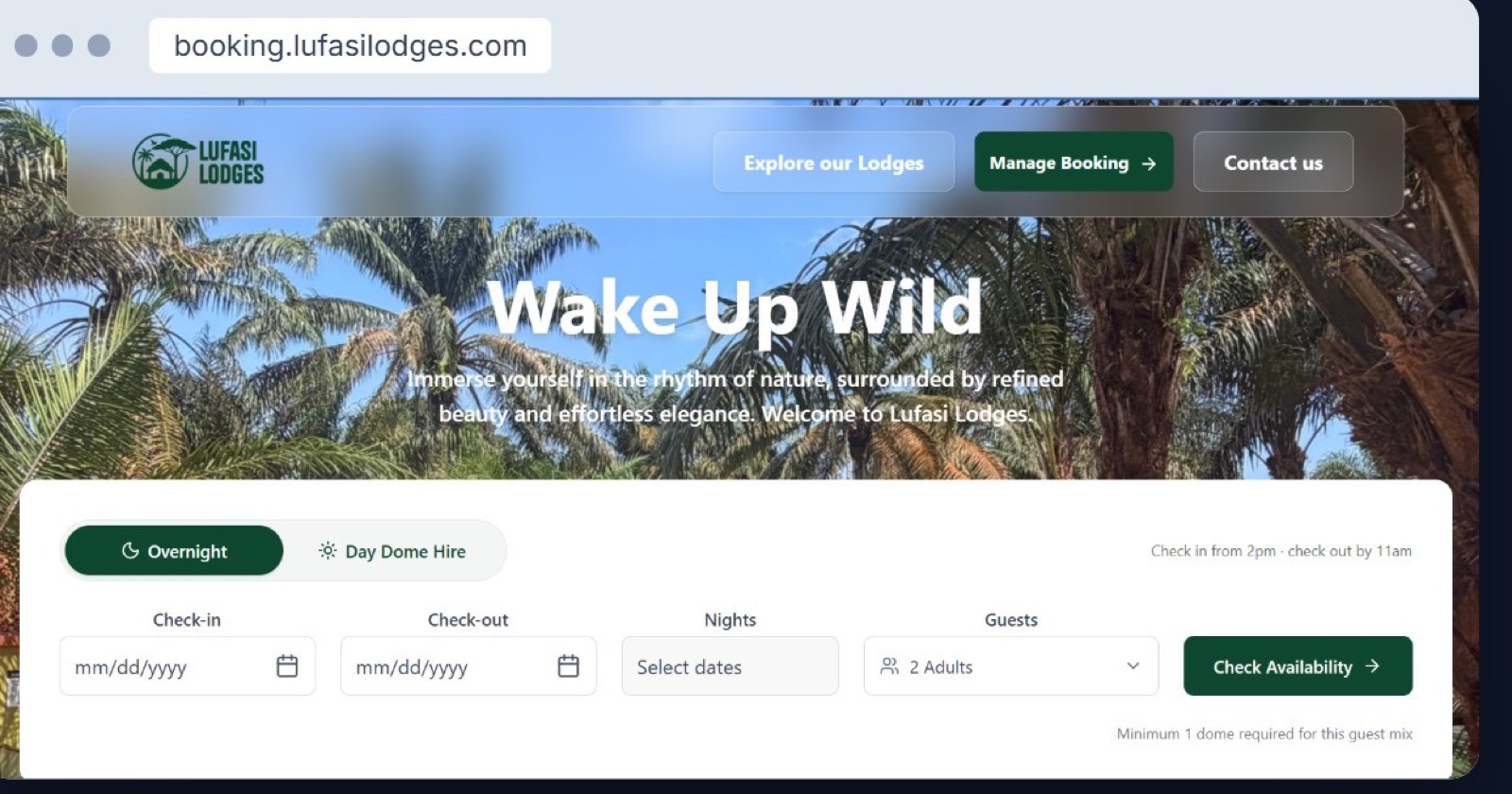
- booking.lufasilodges.com
6
Steps from picking dates to a confirmed booking
9
Admin modules, from bookings and pricing to vouchers and reports
[X]
Weeks from idea to launch
[N]
Bookings taken online since launch
The idea
A forest stay deserves more than a phone call to book
Lufasi Lodges is a glamping camp of geo-domes beside Lufasi Nature Park on the Lekki–Epe Expressway. Each dome has its own name, an en-suite, a skylight shower and a private plunge pool. Guests come for a night away, or just for the day.
The owners wanted guests to see which domes were free, choose one, add the extras that make a stay special, and pay, all without waiting on a reply. They also wanted the team to run every booking from one place.
The brief in one line
Let guests book a named dome, extras included, in minutes, and give the lodge one dashboard to run it all.
Who it is for
Couples and friends planning a nature getaway · Day visitors hiring a dome for a few hours · The front-desk team managing arrivals, rooms and payments
The challenge
Four things a standard hotel booking widget would get wrong
A camp, not a hotel
Guests book a specific dome by name and position, not a room type. And a stay can be overnight or a day dome hire, each with its own rules.
House rules, shown up front
Check-in times, how many domes a group needs, and the age policy for children all have to appear before a guest pays, not after.
Prices with every charge in
Meal plans, extras, discounts, 12.5% consumption tax and VAT, and a 2.5% service charge all add up live, so the total is never a surprise.
A small team running every booking
With a handful of domes, one double booking is a real loss. Staff needed to see arrivals, assign domes, take payments and change rates without calling a developer.
How we did it
From idea to launch in five stages
01 · Discovery
Shape the idea
- Workshop with the owners
- How bookings ran before
- Dome, rate and tax rules
- First-version scope
02 · Design
Design every step
- Six-step booking flow
- Live price summary
- Admin dashboard
- Built on the Lufasi brand
03 · Build
Build the system
- Availability by dome
- Checkout and payments
- Booking references and emails
- Nine admin modules
04 · Launch
Go live
- Tests with real bookings
- booking.lufasilodges.com live
- Front-desk training
- Launch date [date]
05 · Run
Keep it growing
- CTO as a Service retainer
- Hosting and support
- New features
- Channel manager link
Stage 02 · Look and feel
Calm colours from the forest floor
The booking flow uses the lodge's own forest green for every action, so the next step is always clear. Warm sand and cream keep the screens soft, and a pale aqua marks helpful tips and the booking reference.
Wake Up Wild
Forest
#0E472F
Aqua
#B7FFFF
Sand
#ECEAE0
Cream
#FAF8F5
Charcoal
#333333 · admin
Stage 03 · The booking flow
What we designed, and why
Six steps take a guest from dates to a confirmed stay. A price summary sits beside every step, so the total is always in view. Here are the parts that matter most.
Choose your dome
Every dome has a name and a place
Guests don't pick “a room”. They pick Mara, Serengeti or Manyara, and see where each sits in the camp: park side, by the garden, in the middle.
Live status shows which domes are free or taken for the chosen dates, and the price summary adds tax and service charge as soon as a dome is picked.
Guests and extras
House rules in plain sight, and extras that sell themselves
Guests count adults, teenagers and infants separately, and the age policy appears right where they enter children, so no one is turned away at the gate.
The extras step offers room decor, a sunset picnic, drinks and cakes, and a painting session. Each adds to the total as it's ticked, and guests can skip the whole step in one tap.
Confirmation
A booking reference the moment they pay
Every booking gets an LUF reference and a confirmation email with pre-arrival details, a calendar link and directions to the camp.
Guests use the same reference under Manage Booking on the home page to look up or change their stay.
The admin dashboard
The whole camp, on one screen
The team sees bookings, occupancy, revenue and the day's check-ins at a glance. Nine modules cover bookings, the booking page, pricing, guest payments, vouchers and discounts, extras, pods and reports.
Admin in practice
Run every booking without calling a developer
Bookings: every booking by status, pending, confirmed or cancelled, with a dome assigned in one click.
Pricing and configuration: staff change meal-plan and child rates themselves, and every change is saved to an audit log.
Stages 04 and 05 · Launch and run
Built for this camp, and still looked after
We built the system from scratch for Lufasi, not from a template. One backend serves the guest booking site and the admin dashboard, so a dome booked online is gone from the calendar straight away.
Launch was not the end of the job. We stayed on as Lufasi's technology team on a CTO-as-a-Service retainer, keeping the system running and adding what the lodge needs next.
- [Frontend]
- [Backend]
- [Database]
- [Payment gateway]
- Admin dashboard
Live at
booking.lufasilodges.com
Overnight stays and day dome hire, booked and paid for online, with Manage Booking for changes.
In progress
A channel manager link with Channex, so rates and dome availability stay in step between the booking site and the travel sites the lodge lists on.
The result
Live, and booking guests into the forest
Bookings
[N]
Bookings taken online since launch
Direct
[N]%
Of stays booked direct, with no commission
Extras
[N]%
Of bookings that add at least one extra
Occupancy
[N]%
Average dome occupancy in [period]
“[Quote from the Lufasi Lodges team about working with 24 Design Co.]”[Name], [role], Lufasi Lodges
Next case study
Nexuss: one home for Nigeria's family stories
Let’s work together
Got an idea you want to build?
Free 30-minute call. No obligation.
Book a free idea review